// For builders
Stop losing money on “ready to build” customer lots
Your customer says the lot is good to go. Often enough to cost you six figures, the records disagree, and the gap doesn’t show up until permits.
SiteFacts is the lot-qualification workflow built by an operator who ran sales-to-permits at a builder like yours: your rep answers at the first call, your newest salesperson sounds like your best one, and your ops team receives a contract with the constraints already named and priced.
Bring a lot you already know. 30 minutes, on your lot, not ours. Check our findings against what you found the hard way.
Trusted by builders. Reviewed in public.

 Reviews on Google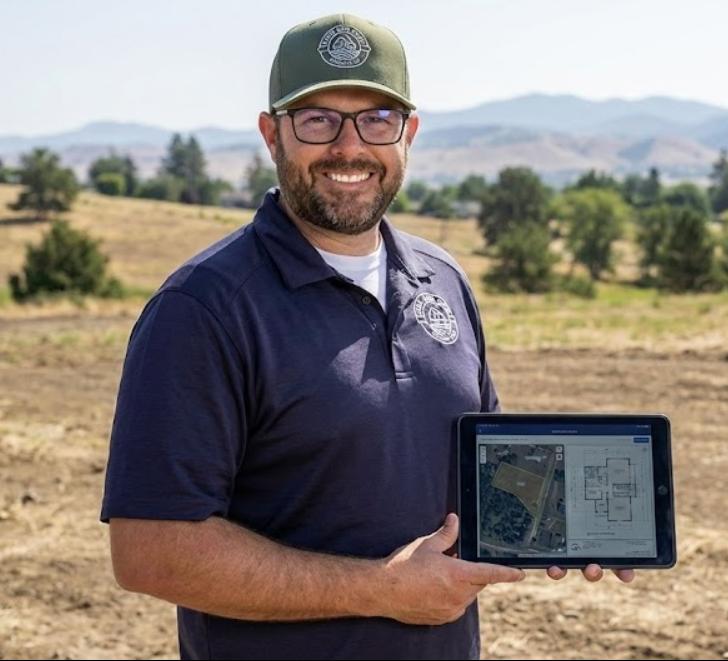
Built by the guy who used to take that call
Before SiteFacts, Don Healy ran operations for a production builder in Oregon. He was the one the salesperson called with “hey, can you take a quick look at this lot?” He drove out with the laser. He found the geotech requirement at permit submission. He stood on a 40-acre parcel trying to turn “next to the oak tree” into dimensions.
Every tool in this application exists because a specific deal bled at a specific step. This isn’t a workflow we designed by interviewing builders. It’s the one we ran, transcribed into software.
He tells these stories at length onthe podcasts he has been on.
The cost of “can you take a quick look?”
When I ran operations, a lead would come in Tuesday. The rep knew the area had slope, so he called me, because I was the only one who could tell him. I found the tax lot, pulled the zoning, checked FEMA and wetlands, and either drove out with the laser or gave the honest answer: “I’m through there next week, I’ll look then.”
Five days off the sales cycle. Four to six hours off your operator’s day. And the customer, who is talking to two other builders, has been waiting since Tuesday for someone to sound like they know the answer. The first 24 to 48 hours after a lead lands is where trust gets built or lost.
And here’s what nobody says out loud: the question was never just “can we build this lot.” It was “do we want to, for this customer, at this margin, with the queue we’ve got.” You can’t make that call in five days. You can make it in the first phone call.
95 seconds inside the app.
 1:35
1:35Bring the lot that burned you. See what we would have caught.
Case study
How Simplicity by Hayden Homes eliminates site risk before it becomes a costly problem
- Issues caught before contract that would have run tens of thousands over budget
- Prevented costly site surprises that could have derailed budgets downstream
- Enabled long-term homeowner trust
- Four SiteScores into one Minnesota production builder’s pilot: two customers walked away from their lots, and neither canceled their design agreement. Fire the lot. Keep the customer.
“SiteFacts caught issues that could have pushed projects tens of thousands over budget. Instead of finding out later, we are able to communicate with homeowners upfront, building trust every step of the way, and they stay with us because of it.”
“We already have access to setbacks, wetlands, and zoning.”
You do. So did we, when we ran a builder’s operations. Access was never the problem.
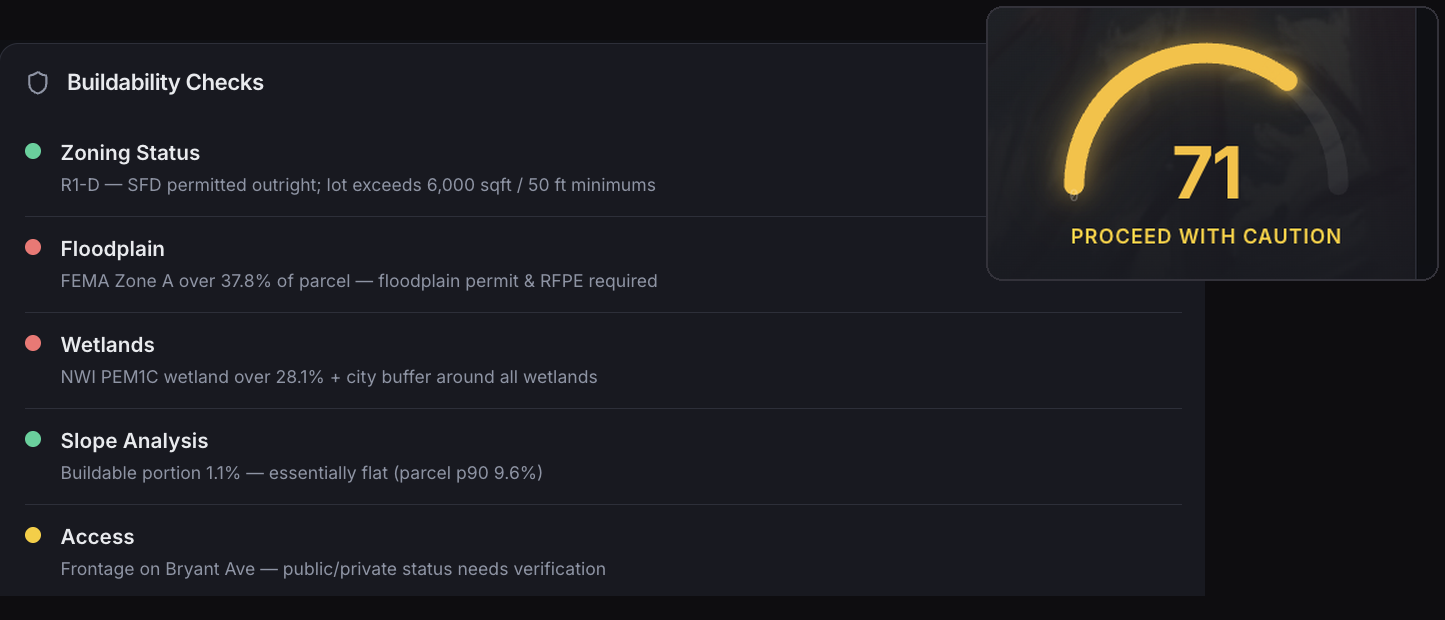
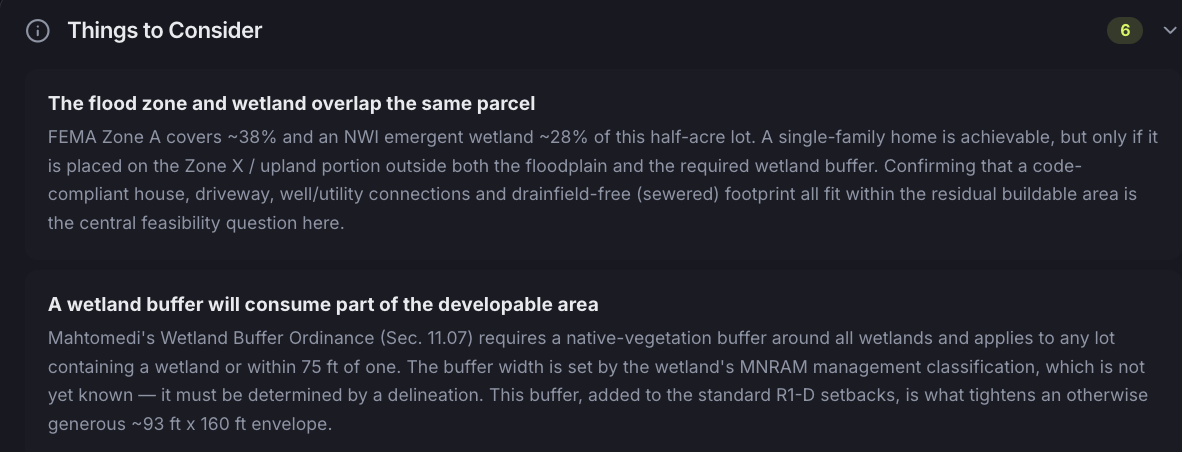
Look at one real half-acre lot. FEMA puts Zone A over 38 percent of it. The National Wetlands Inventory maps a wetland over another 28 percent. The city’sbuffer ordinanceadds a native-vegetation strip nobody can size until a delineation, and the zoning setbacks take their share off every side.
The question that decides the deal is what’s left, and no county website computes it. Whether a code-compliant house, driveway, and utilities still fit in the residual buildable area is arithmetic across all four, plus an ordinance most people read for the first time at permitting. That synthesis is the product. A person checks it, and every claim carries its citation.
If you can run that synthesis yourself, you already know what it costs you. SiteFacts puts a working version of it in your reps’ hands in seconds, and saves yours for the lots that deserve it.
It’s not a data viewer, and it’s not a report mill. It’s the lot-qualification workflow, end to end: the app is the front door your reps walk through every morning, the SiteScore is the script your newest salesperson can read to a customer because a person checked it, and the Report is the document your ops team builds from without calling anyone back. The report comes out the end. The workflow is where your sales week happens.
Every regulatory claim in a SiteFacts Report is checked by a person and cited to the governing authority: the county, the city, the code section. Ask any other report you’re using who verified it, and read the disclaimer at the bottom before you answer.
The builders running this tell us the overlap with their own checks is the point: it confirms what they found. What they pay for is what they didn’t.
30 minutes, on your lot, not ours. No deck.
The synthesis
Two findings on that same half-acre lot: what the overlapping flood zone and wetland leave buildable, and how the city’s buffer ordinance, cited by section, tightens it further.
The application
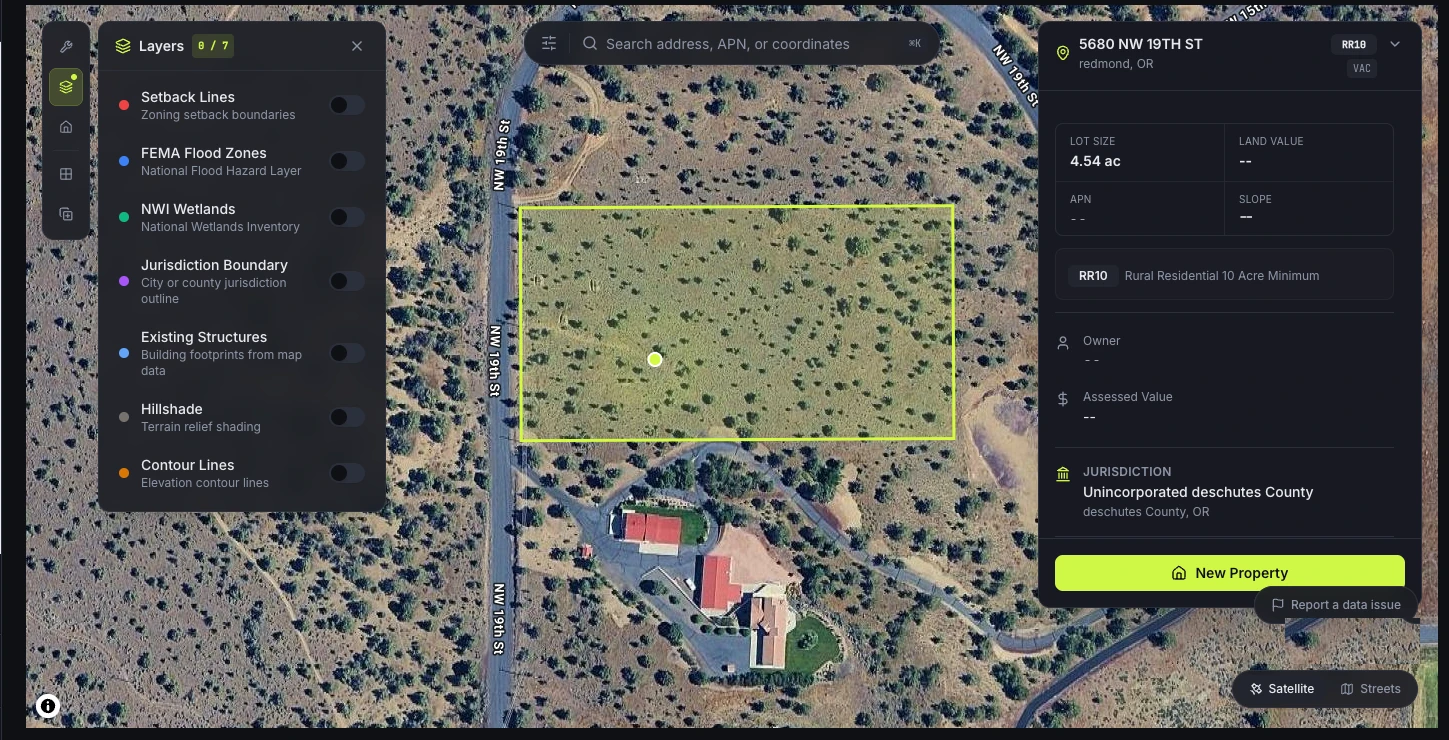
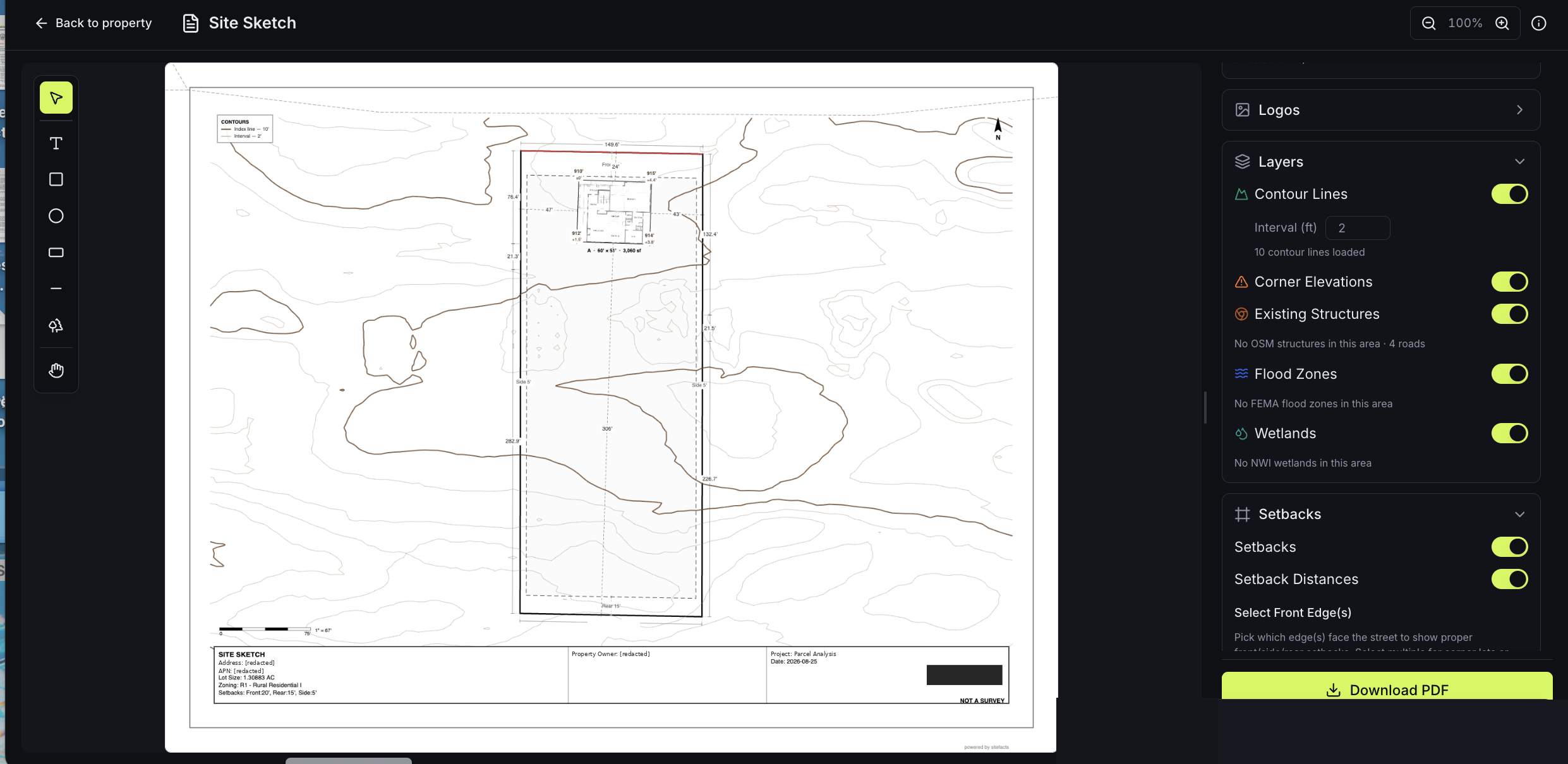
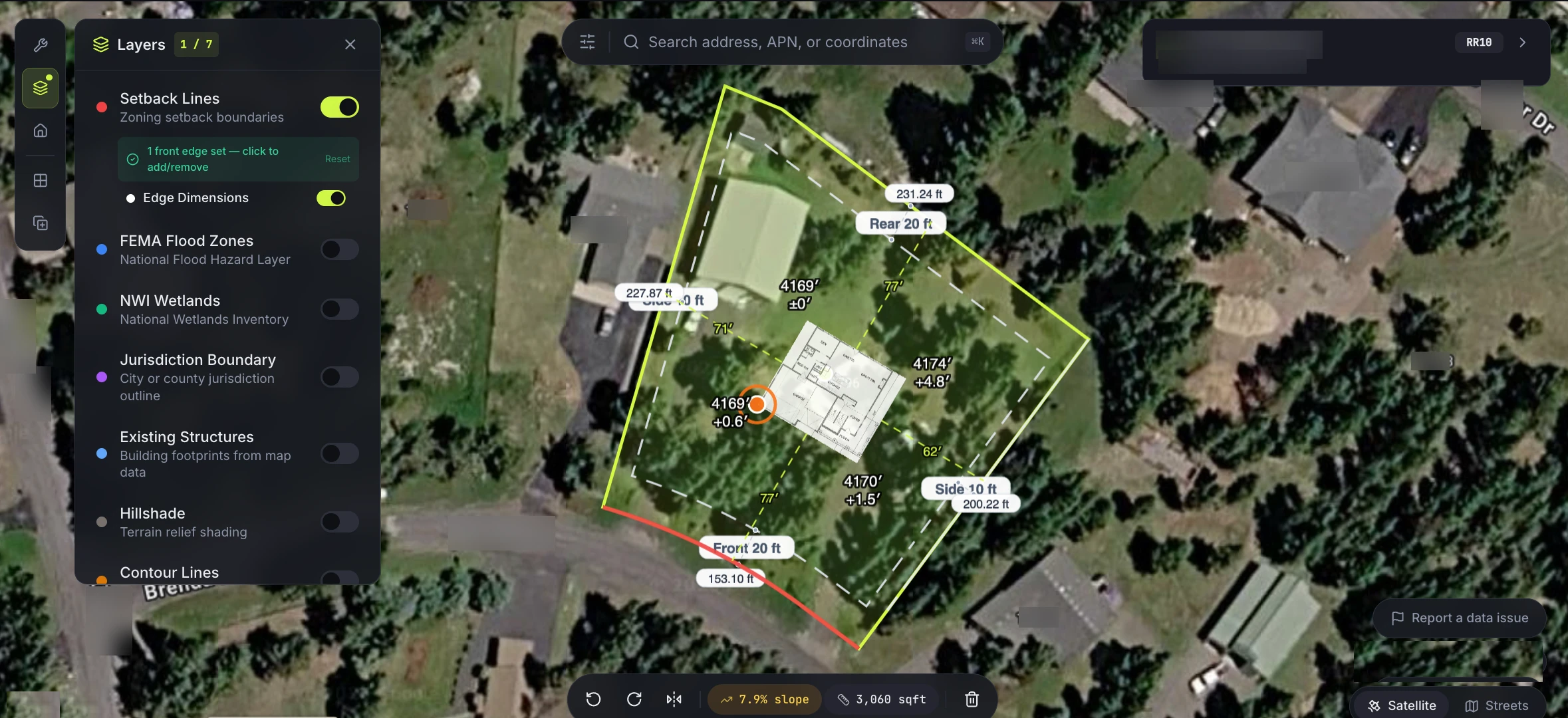
Site Sketch, one of the tools inside it: place the house, dimension the setbacks, toggle layers, add your logo, export a PDF.
When “ready to build” isn’t ready at all
Customers say the lot is good to go. The records often say otherwise. Here’s the difference SiteFacts makes on a customer lot.
Without screening
- Rep walks the property blind and tells the customer it’s a nice tree
- Ten days to get eyes on the lot, and daily calls of “why aren’t you out there yet?”
- Geotech surfaces at permit submission, and comes out of your margin
- Sales hands ops a package with gaps; ops picks up the pieces
- You find out the lot needed a conditional use permit after contracts went to permitting
With SiteFacts
- Rep opens the lot before the first meeting and speaks to zoning, slope, and access
- An answer inside the first call
- Geotech priced into the contract, where margin still applies
- Sales hands ops a verified lot with the constraints named
- The customer heard the number was going to be hard on day one, and stayed anyway
Same cost, different date, completely different conversation.
The play, step by step.
01 LOOK
Your agent, live at the sales table.
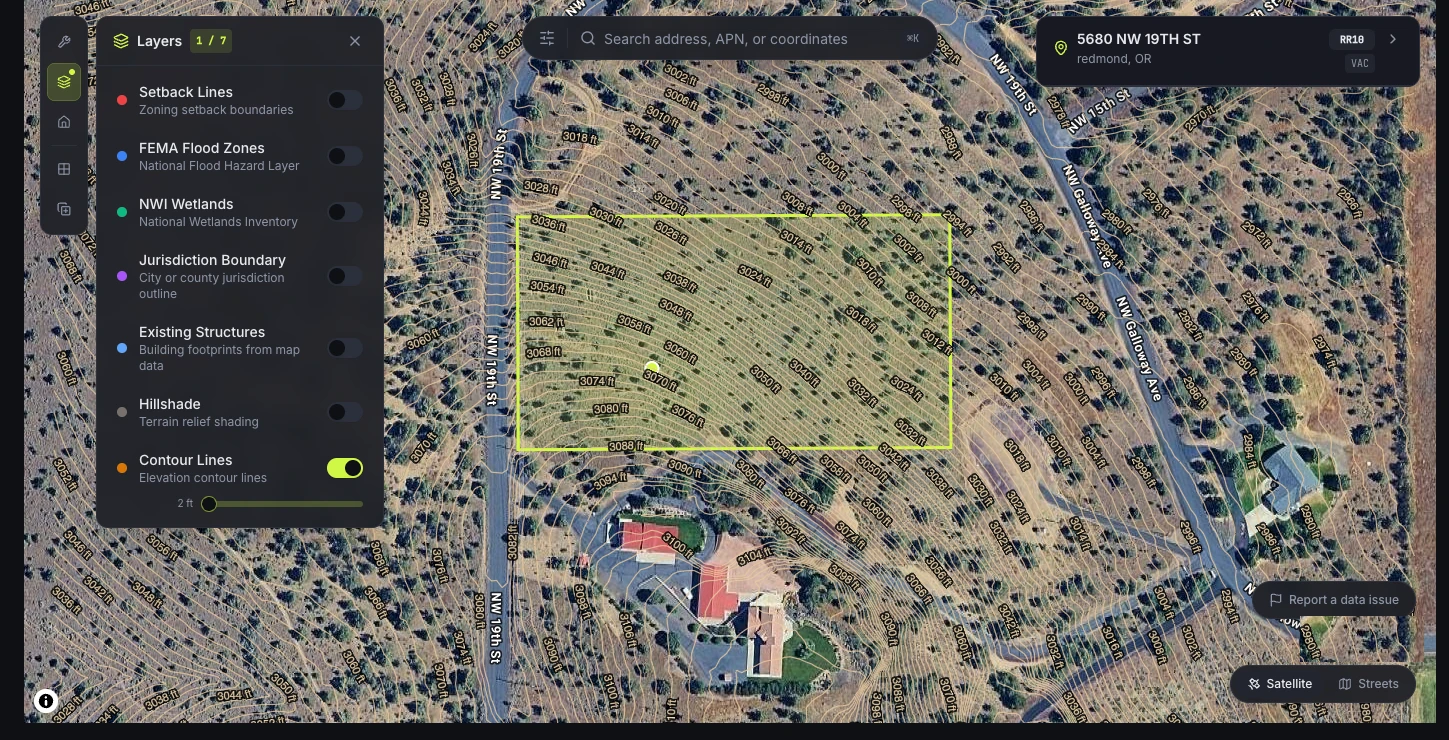
Any parcel, on the first call. Zoning, slope, flood, wetlands, setbacks, organized into a read, not a pile of layers. Contours to two-foot increments across the building envelope, not the parcel average.
Unlimited lookups, every rep, no meter, because the lot nobody thought to check is the one that costs you. And the first decision it powers isn’t “can we build here.” It’s “do we want to, for this customer, with the queue we’ve got.”
02 SCREEN
Your newest rep, sounding like your best one.
Your customer isn’t asking about zoning or setbacks. They show up with a dream and a lot, and it’s your job to make sure the two fit. A SiteScore answers the five questions that decide it: Is the property zoned appropriately? Are there federal floodplains? Federal wetlands? Impacting slope? Is there access? Each answer Go, Caution, or Stop, written so a rep can read it to a customer without translating it first.
It’s the difference between “there’s some slope” and “that’s twenty feet of fall, which means engineered foundation and retaining walls. Let’s talk about whether that’s the house you want.” Back in 48 hours, while the lot is still inside its contingency window. Your veteran may not need it. The rep who was selling phones three weeks ago absolutely does, and it’s right, because a person checked it.
03 VERIFY
Your ops team, before you commit a budget.
The SiteFacts Report: human-verified, jurisdiction-specific, in 5 business days. Zoning and overlays, setbacks and deed restrictions, wetlands and floodplain, real distance to water, sewer, power and internet with what to budget for the runs, soils, access.
Every regulatory claim traced to the governing authority: when your PM or your customer asks “says who,” the answer is on the page. Ordered at pre-construction contract, so you build the bid strategy from the questions the report surfaces, not from the rep’s best recollection.
04 BUILD
Findings become the work list.
A 600-foot power run isn’t a problem. A 600-foot power run discovered after contract is. One finding sets off a chain: conduit, a transformer at 300 feet, an excavator bid, an electrician to pull wire, vault pricing. All of it knowable before signing. All of it line-itemed, instead of argued about.
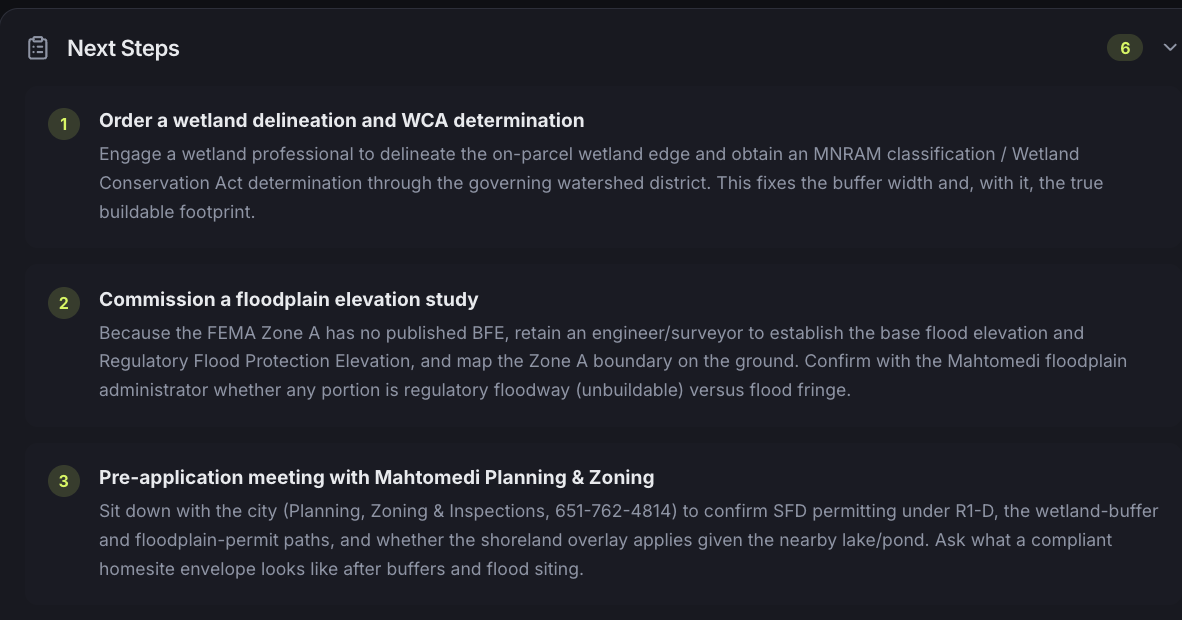
Every SiteFacts Report ends with numbered next steps: the delineation, the elevation study, the pre-application meeting, with the agency and the phone number already on the page.
48 hours from address to answer.
Stop describing where the house goes.
“It’s next to the oak tree, about five feet off the well house.”
That’s how house placement gets communicated today: over the phone, from a rep who was standing on the lot to a construction manager who wasn’t. Then somebody walks the property with a measuring wheel and flags, and tries to convert a customer’s vision into dimensions off the property corners. On a 40-acre parcel with corners 500 feet out, that doesn’t work, and everybody knows it doesn’t work.
Site Sketch puts the house on the lot, to scale, and gives you back a drawing: setbacks dimensioned, two-foot contours, corner elevations, lot size, zoning, and a north arrow and scale bar. Your logo on it, not ours. Download it as a PDF and hand it to the customer.
It says NOT A SURVEY on the face of it, because it isn’t one. It’s the page that gets everyone agreeing on where the house goes before anybody pays an engineer.
Lock the placement once, at the front of the process, with the customer sitting there. Not again at permitting, and not a third time when the CM shows up and asks where they really want it.
The sketch is also the first page of the package sales hands ops: placement locked, in writing, with the customer’s signature on the vision instead of their memory of it.
At the sales table
The floor plan placed on the parcel, setbacks validated, slope and square footage live. Contours, corner elevations, existing structures, flood zones, and wetlands, each a layer you turn on or off.
The deliverable
The drawing that comes out the other end: dimensioned, scaled, your logo on it, downloaded as a PDF.
What sales hands ops determines the job.
In a production shop, operations builds from what’s in the package. The package is the product of your sales process, and SiteFacts front-loads it.
In a custom shop, one person holds the customer’s hand the whole way. In a production or semi-production shop, a rep gathers the best information they can, writes a contract, and hands it to operations.
When the package has gaps, the machine stops. Permits come back asking for ageotechnical evaluation. Now you’re finding a geotech, waiting on a report, getting excavator bids on whatever it recommends, and deciding who pays for all of it, mid-schedule, on a job that was supposed to be running clean.
Ops receives a lot with its constraints named, priced, and cited. Estimating builds site-condition budgets from data. And the customer heard the hard number on day one, from a rep who sounded like they’d done this before. Because the workflow had.
The report
What’s inside a SiteFacts Report
Human-verified. Jurisdiction-specific. Every claim cited to the governing authority. This is the difference between a report and a lookup.
Zoning, setbacks & legal compliance
What the land is allowed to become: overlays, setbacks, deed restrictions, and use limits, checked against the jurisdiction’s own code, not a generic zoning lookup.
Environmental & wildlife considerations
Wetlands, floodplains, protected habitat, and the wildland-urban interface.
Utilities & infrastructure availability
Real distance to water, sewer, power, and internet, and what to budget for the runs. Proximity is not access.
Risk factors & development costs
Slope across the building envelope, soils, access, and the site-work budget those constraints imply.
Expert analysis, with the receipts
A plain-English verdict on what to do next, and a citation trail behind every regulatory claim, so it holds up with your customer, your PM, and the permit counter.
One of the five, made real
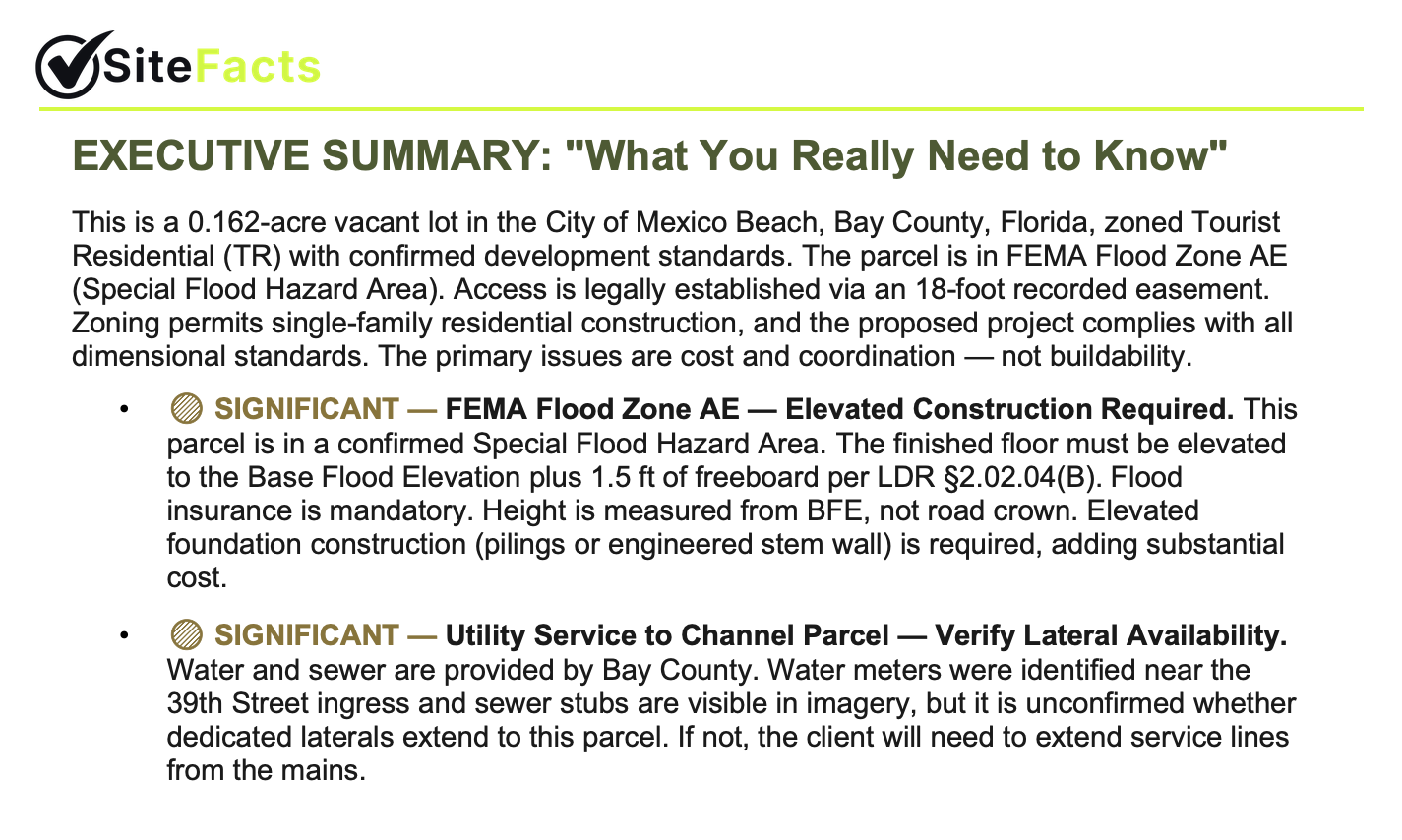
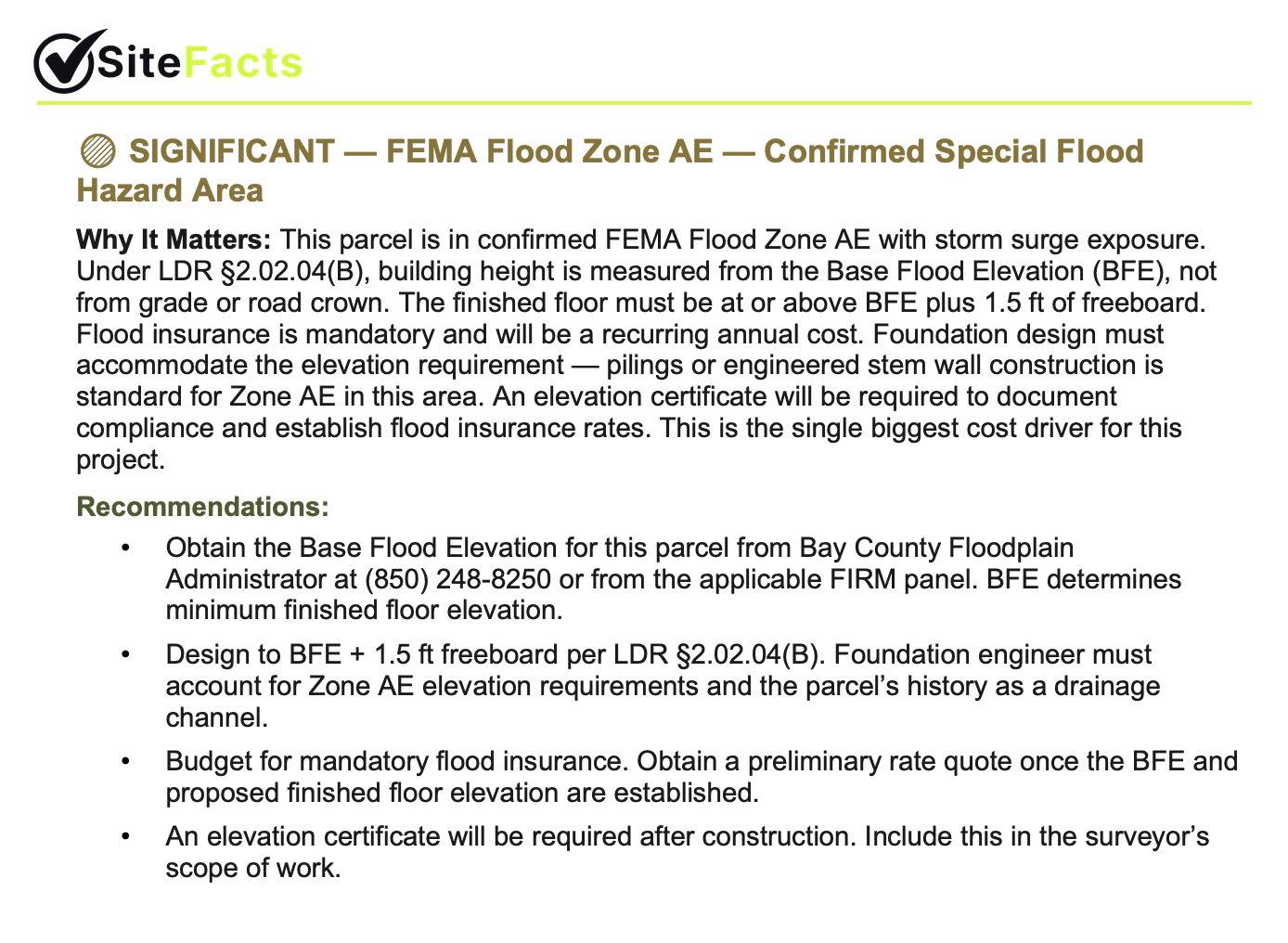
A finding from a real report: what it costs, why it matters, and who to call, with the governing code cited.Read a full sample report.
And a few others, caught before contract:
Bring a lot you already know. Check our findings against what you found the hard way.
The answer keeps getting better.
Parcel data sourced straight from the jurisdictions and re-pulled every two weeks. Hundreds of reports verified line by line by our own team, with every verification fed back into the database. We call it the Ground Truth Loop, and it means the answer you get on your next lot is better than the one we could have given you last year.
Ask us which counties we source directly.
- 01
SOURCED DIRECTLY
from the counties, not a vendor
- 02
REFRESHED EVERY TWO WEEKS
a county change lands inside two weeks
- 03
VERIFIED BY PEOPLE
line by line, against the code
- 04
FED BACK IN
every report sharpens the next
and back to 01
Cited per claim: county assessors, FEMA, NWI, NRCS soils, local zoning code.
FAQ
Builder questions
We already have access to setbacks, wetlands, and zoning. What does this add?
How does SiteFacts fit into our pre-con process?
Do you offer volume pricing or retainers?
Can we share the report with clients?
How long does it take?
Can we put our own branding on what we show customers?
Do our reps need to be technical to use this?
What can a rep safely tell a customer at each stage?
Can we run a lot we already know?
Can this convert leads, or just screen lots?
Running reports every month?See how Builder Program accounts are structured, or read the general FAQ.
New in the seat? New competitor in town? Just ate a lot you shouldn’t have?
That’s usually when builders find us. Change is painful; that’s why the first step isn’t a rollout. It’s one lot, one screen, 48 hours.
Bring the one that burned you.
Bring us the lot that burned you.
The demo is 30 minutes. No deck. We pull up your lot, one you already know the hard way, and you check our findings against what it actually cost you. If we don’t catch what you caught, you’ll know in the first ten minutes and we’ll part friends.